Sunday, February 23, 2020

Saturday, February 22, 2020

Monday, July 10, 2017
Video calling app using WebRTC
I had a work around related to WebRTC recently. So I thought of sharing some information relevant to it. The requirement is to build an app to establish a peer to peer video conferencing
What done so far
User logs with a particular login name and establish a call. With proper coverage, communication happens properly. There are following R & D and new features to be done.
R&D
1. When low coverage, voice should be prioritized while video is dropped.
2. Sometimes video stream is stucked and it does not reconnect again.
3. Multiple users have logged, call A to B, B to C, C to A etc , then sdp protocol issue is occurred. Renegotiation problems causes in this case.
4. Once a video is stucked, you cannot get the call again.
5. Showing the presence status (online, offline, busy etc.)
To do features
6. Video/Audio mute
7. Chat functionality
Technology
WebRTC, nodejs (server side), JQuery, Bootstrap (for front end)
Work flow
Started following the tutorial here. You can refer some other references as well.
https://www.tutorialspoint.com/webrtc/webrtc_video_demo.htm
According to above tutorial configure node server using following step.
Create a folder in one of your local directory and copy the package.json and server.js there. And install node using npm install and use Node Inspector to debug. (https://spin.atomicobject.com/2015/09/25/debug-node-js/)
Then you will see node_modules folder created. I have commented out ssl related codes on server.js and you will not need ssl folder contents here. But deployed version actual certificates are available.
When you debug you will see the following.

Once you have setup the server, with the front end implementation we can run the application. I have used ASP.NET MVC project for my convenience for the client.js and other user interfaces.
VideoDemo/js
1. client.js – the javascript file which communicate via node server
2. preferopus.js – workaround done to have clear video streaming
VideoDemo/Resources
I have used a bootstrap template. So, this location includes css, js etc, which comes with that template. There are unnecessary files here. We can remove those.
Front end
Once you run the app with two browser tabs/windows, and get a call to the other.

References
https://www.avaya.com/blogs/archives/2014/08/understanding-webrtc-media-connections-ice-stun-and-turn.html
- Concepts of STUN/TURN servers
https://github.com/muaz-khan
-
This guy has done lot of experiments on WebRTC. There are
many articles that we refer on stack overflow
Other applications built using WebRTC
https://opentokrtc.com/
Other
Monday, June 26, 2017
CSS3 - few things
mainstyle.css
@import "heading.css";
@import "paragraph.css";

/*All the document*/
*{
    font-family: "Arial Black", 'Gill Sans', 'Gill Sans MT', Calibri, 'Trebuchet MS', sans-serif;
}

/*Inside All divs*/
div * {
    font-family: "Comic Sans MS", cursive, sans-serif;
}

/*Cascade down i.e override above styles*/
.sitelink{
    font-family: Georgia, serif
}

#tonyquote {
    font-family: "Lucinda Sans Unicode", 'Lucida Sans', sans-serif;
    color:black;
}

/*Paragraph inside sitelink class*/
p.sitelink{
    font-family: "Palatino Linotype", "Book Antiqua", Palatino, sans-serif;
    color: black;
}

span#tonyname{
    font-family: "Times New Roman", Times, serif;
    color: red;
}

#tutorials ol li{
    color: purple;

}

#tutorials ul li{
    color: green;
}
/*target paragraph comes immediately after the h3 tag*/
h3 + p {
    font-style:italic;
}
/*target the link inside the paragraph immediately comes after h3 tag*/
h3 + p > a{
    color: red;
}

/*every single pargraph which has a class */
p[class]{
    background: grey;
}
/*every single pargraph which has a id */
p[id]{
    background: yellow;
}

/*anything with the alt nintendo*/
*[alt~="nintendo"]{
    background: orange
}
reference : newthinktank tutorial
Wednesday, January 11, 2017
What .NET Developers ought to know to start in 2017 by SCOTT HANSELMAN
Just have a look on this article.:)
http://www.hanselman.com/blog/WhatNETDevelopersOughtToKnowToStartIn2017.aspx
http://www.hanselman.com/blog/WhatNETDevelopersOughtToKnowToStartIn2017.aspx
Monday, August 29, 2016
Thursday, August 25, 2016
Sunday, April 24, 2016
CSS3 Attribute selectors
It is possible to style HTML elements that have specific attributes or attribute values.
Example :

CSS [attribute^="value"] Selector
The [attribute^="value"] selector is used to select elements whose attribute value begins with a specified value.
CSS [attribute$="value"] Selector
The [attribute$="value"] selector is used to select elements whose attribute value ends with a specified value.
CSS [attribute*="value"] Selector
The [attribute*="value"] selector is used to select elements whose attribute value contains a specified value.
Example :

Thursday, April 21, 2016
Looking into HTML5
HTML5 is used basically to create sweet awesome websites. It is a combination of XHTML, CSS and Javascript.
XHTML >> Core basic elements of the web site or the foundation
CSS >> How you make everything looks beatuful
Javascript >> functionality interactivity, makes it smarter
So HTML5 which ties above together, it takes web development into
next level. Web sites are not like reading a book. Now it is more
interactive. So HTML5 does the job.
Things that are very important in a HTML5 website.
- Doctype – Should be html
- Html – exact same html tag in Xhtml
- Lang – what language are you using
- Head and body – exact same as XHTML
- Meta tag to define character set = self inclosed tag – so only need one - How your browser inteterprets character
- Meta tag - Like credits in a movie – not required but nice to have
- Link –Referece to outside file
- Rel – relative – how this link related to this web site
- Href - What file is it
So basic HTML5 website has the following structure.

With more html tags,


Article – Groups similar information not like a newspaper
article
Has own layout like its header, footer etc
Can have more than one article in a section
Thanking to thenewboston.com.
Hope this basic information helps !!!
Tuesday, March 15, 2016
How to create template as a resource - C# WPF
Templates are generally used to provide common appearance for multiple controls. So they are defined as resources for the re usability.
Please see the example code in folder Chap5Les2 in this link.
https://github.com/Nalani/WPF
This is the output for the code.

Tuesday, January 19, 2016
Monday, November 16, 2015
10 features in C# that you really should learn and use
My eye caught a very important article regarding C# features.
Have look on this. :) Very useful
http://www.codeaddiction.net/articles/15/10-features-in-c-that-you-really-should-learn-and-use
Have look on this. :) Very useful
http://www.codeaddiction.net/articles/15/10-features-in-c-that-you-really-should-learn-and-use
Friday, August 28, 2015
Difference between MVC, MVP and MVVM
An interesting article I could find for the above question
http://www.codeproject.com/Articles/228214/Understanding-Basics-of-UI-Design-Pattern-MVC-MVP
http://www.codeproject.com/Articles/228214/Understanding-Basics-of-UI-Design-Pattern-MVC-MVP
Sunday, August 23, 2015
Saturday, August 22, 2015
Await and Async keywords in .net 4.5
Moving to .NET 4.5, Async and Await key words are introduced for Asynchronous Programming in C#. Let's have a quick look on what these are.
Async and awit are markers which mark code positions from where control should resume after a task (thread) completes.
See the following example,
1. It goes from Main to Method() and invoked LongTask()
in a multi threaded way.
2. And code then goes ahead "COnsole.WriteLine("New thread")"

But we want to wait LongTask() to run and then exeute "Console.WriteLine("New thread")".
So "COnsole.WriteLine("New thread")" this should wait untill LongTask() is done.
So this is what you do with above keywords,

reference : www.questpond.com
Async and awit are markers which mark code positions from where control should resume after a task (thread) completes.
See the following example,
1. It goes from Main to Method() and invoked LongTask()
in a multi threaded way.
2. And code then goes ahead "COnsole.WriteLine("New thread")"

But we want to wait LongTask() to run and then exeute "Console.WriteLine("New thread")".
So "COnsole.WriteLine("New thread")" this should wait untill LongTask() is done.
So this is what you do with above keywords,

Now ,
after LongTask() is done, "Console.WriteLine("New thread")" line is executed means it waits till 20s and show "New thread" in the console.
Hope you have got the point. !!
Wednesday, July 1, 2015
Filtering in Angular Js
This is also a sample from the reference source "AngularJs Fundamentals in 60- ish minutes" in https://www.youtube.com/watch?v=i9MHigUZKEM
We can do filter using "filter and '|' "
Following example is to filter from group of customers using using the customer name or city name typed in the text box.
<!DOCTYPE html>
<html xmlns="http://www.w3.org/1999/xhtml" data-ng-app ="">
<head>
<title>Using AngularJs directives and data binding</title>
</head>
<body data-ng-init ="customers=[{name:'John Smith',city:'Phoneix'},{name:'John Doe', city:'New York'},{name:'John Doe', city:'San Francisco'}]">
Name:
<br />
<input type="text" data-ng-model ="name" /> {{name}}
<br/>
<ul>
<li data-ng-repeat ="cust in customers | filter: name">{{cust.name}} - {{cust.city}}</li>
</ul>
<script src="Scripts/angular.min.js"></script>
</body>
</html>

We can do filter using "filter and '|' "
Following example is to filter from group of customers using using the customer name or city name typed in the text box.
<!DOCTYPE html>
<html xmlns="http://www.w3.org/1999/xhtml" data-ng-app ="">
<head>
<title>Using AngularJs directives and data binding</title>
</head>
<body data-ng-init ="customers=[{name:'John Smith',city:'Phoneix'},{name:'John Doe', city:'New York'},{name:'John Doe', city:'San Francisco'}]">
Name:
<br />
<input type="text" data-ng-model ="name" /> {{name}}
<br/>
<ul>
<li data-ng-repeat ="cust in customers | filter: name">{{cust.name}} - {{cust.city}}</li>
</ul>
<script src="Scripts/angular.min.js"></script>
</body>
</html>

Monday, June 29, 2015
AngularJs
I would like to open up a basic step into Angular Js in this post.
First question came up into my mind when I started to learn is "Why AngularJs?"
So the answer is here. Read these posts which are very helpful for the above question
http://jeffwhelpley.com/angularjs/
http://stackoverflow.com/questions/14994391/thinking-in-angularjs-if-i-have-a-jquery-background/15012542#15012542
This is a sample for "Using directives and data binding" from the reference source "AngularJs Fundamentals in 60- ish minutes" in https://www.youtube.com/watch?v=i9MHigUZKEM
I have created VS 2013, ASP.NET project and added the following html page with angular.min.js file inside the script folder. You can download the angular.min.js file in https://angularjs.org/


<!DOCTYPE html>
<html xmlns="http://www.w3.org/1999/xhtml" ng-app ="">
<head>
<title>Using AngularJs directives and data binding</title>
</head>
<body>
Name:
<br />
<input type="text" ng-model ="name" /> {{name}}
<script src="Scripts/angular.min.js"></script>
</body>
</html>
First question came up into my mind when I started to learn is "Why AngularJs?"
So the answer is here. Read these posts which are very helpful for the above question
http://jeffwhelpley.com/angularjs/
http://stackoverflow.com/questions/14994391/thinking-in-angularjs-if-i-have-a-jquery-background/15012542#15012542
This is a sample for "Using directives and data binding" from the reference source "AngularJs Fundamentals in 60- ish minutes" in https://www.youtube.com/watch?v=i9MHigUZKEM
I have created VS 2013, ASP.NET project and added the following html page with angular.min.js file inside the script folder. You can download the angular.min.js file in https://angularjs.org/


<!DOCTYPE html>
<html xmlns="http://www.w3.org/1999/xhtml" ng-app ="">
<head>
<title>Using AngularJs directives and data binding</title>
</head>
<body>
Name:
<br />
<input type="text" ng-model ="name" /> {{name}}
<script src="Scripts/angular.min.js"></script>
</body>
</html>
Try it !!
Saturday, April 25, 2015
Simple example using Windows Form container controls
This is a practice exercise for using container controls in WinForms stated in MCTS 70-511 book.
Hope this helps.!!
https://drive.google.com/drive/u/0/folders/0B50nOWpE-RyLfjhLa2oyc1l3TUZsV3dXOS01THZMUm1PVG53LTFMdU94bGdORnh2RG5TY28
Hope this helps.!!
https://drive.google.com/drive/u/0/folders/0B50nOWpE-RyLfjhLa2oyc1l3TUZsV3dXOS01THZMUm1PVG53LTFMdU94bGdORnh2RG5TY28
Monday, April 20, 2015
Panel control in Windows Forms
Some important properties of panel control have been highlighted here.
1. Border Style


2. Border Style


Since I have set the AutoScroll property to True I can scroll to see the invisible controls out side the panel border.
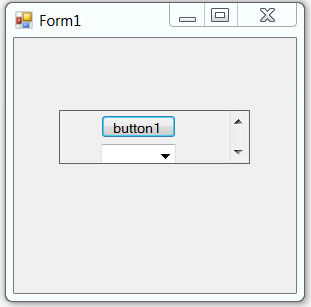
1. Border Style
2. Border Style
Since I have set the AutoScroll property to True I can scroll to see the invisible controls out side the panel border.
Friday, December 26, 2014
Flipping an UI element
What happens when you flip an UI element?
The following button has been flipped horizontally.
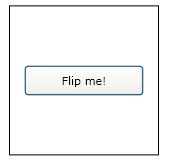

The button was flipped, but it was also moved. That's because the button was flipped from its top left corner. To flip the button in place, you want to apply the ScaleTransform to its center, not its corner. An easy way to apply the ScaleTransform to the buttons center is to set the button's RenderTransformOrigin property to 0.5, 0.5.

To flip the button vertically, set the ScaleTransform object's ScaleY property.
<Button RenderTransformOrigin=".5, .5" Height="50" Width="100" VerticalAlignment="Bottom">
<Button.RenderTransform>
<ScaleTransform ScaleY="-1"></ScaleTransform>
</Button.RenderTransform> Flipped Button
</Button>

The following button has been flipped horizontally.
<Button Height="50" Width="100" VerticalAlignment="Bottom">
<Button.RenderTransform>
<ScaleTransform ScaleX="-1"></ScaleTransform>
</Button.RenderTransform> Flipped Button
</Button>
<Button RenderTransformOrigin=".5, .5" Height="50" Width="100" VerticalAlignment="Bottom">
<Button.RenderTransform>
<ScaleTransform ScaleX="-1"></ScaleTransform>
</Button.RenderTransform> Flipped Button
</Button>
To flip the button vertically, set the ScaleTransform object's ScaleY property.
<Button RenderTransformOrigin=".5, .5" Height="50" Width="100" VerticalAlignment="Bottom">
<Button.RenderTransform>
<ScaleTransform ScaleY="-1"></ScaleTransform>
</Button.RenderTransform> Flipped Button
</Button>
Subscribe to:
Posts (Atom)